Drone-Hacks offers a simple way for you to see all details of your subscription and cancel it if you wish with no unnecessary complications.
¶ View Subscription Details
All of your subscription details are in your Profile under My Profile >Mobile Subscriptions or by clicking This Link.
On this page you can see your subscription type, the auto-renewal status and the next billed amount, as well as being able to manage your bound devices and see all invoices associated with the subscription you have.
¶ Unbinding Devices
Each account supports a maximum of 5 devices bound to it at any one time. Once added, a device cannot be unbound for 14 days to prevent abuse. However after this point, the device can be deleted, freeing up a slot for a new drone. This does not remove any DH licenses associated with the device, it simply removes it from your bound devices in DH Mobile.
To do this, simply visit your Mobile Subscriptions page and click the delete icon next to the device.
If the icon is disabled, then the cooldown period has not yet been reached

¶ Canceling Auto-Renewal
At any stage during your billing cycle, you are free to cancel your subscription.
Canceling during a billing cycle still allows you full access to DH Mobile until the end of your subscription period as shown in the Mobile Subscriptions page on your Profile.
Canceling couldn't be simpler! Simply visit My Profile >Mobile Subscriptions or by clicking This Link.
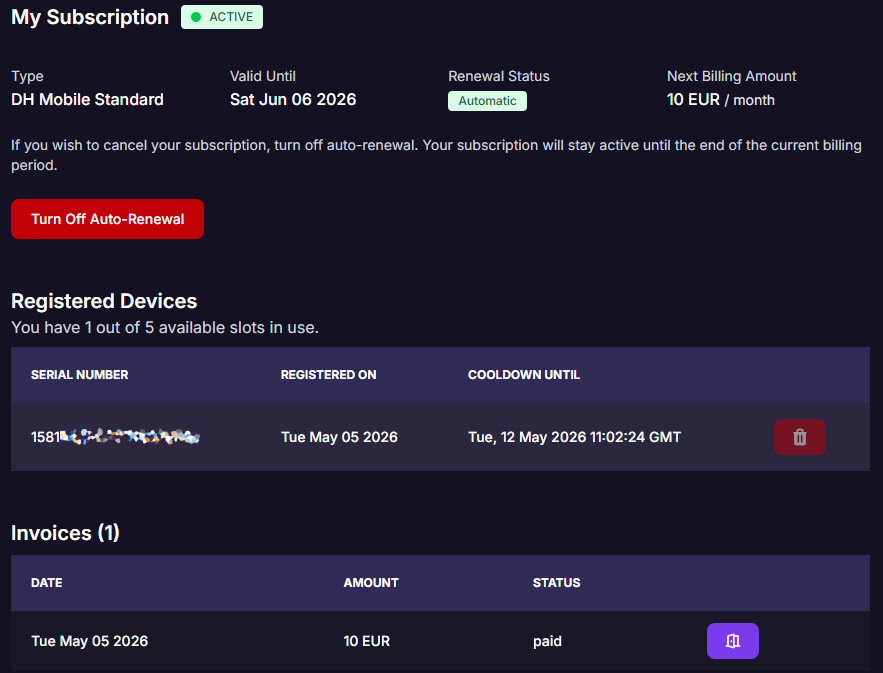
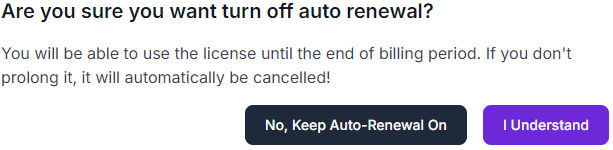
Once there, click the “Turn Off Auto-Renewal” button and you will see this dialogue. Simply click ‘I Understand’ to cancel.
You will notice the Next Billing Amount now shows “Not Available” since you wont be charged again and Renewal Status is on Manual. This confirms your subscription is set to expire at the date shown in the “Valid Until” section in the Mobile Subscriptions page.
