With the Drone-Hacks mod box, you can apply One-Shot FCC power levels to many drones, even ones not supported by the main Drone-Hacks application. You can do this when out in the field without wifi or mobile signal as the module requires no connection back to our servers. The module is also upgradable via the Drone-Hacks desktop app for feature and firmware updates!
As a reminder, enabling FCC power levels may not be legal in your country or region and you, as the operator, remain responsible for safe and lawful use of your drone.
¶ Supported Models
List Last Updated: 17th August 2026
| Drone Model | Supported |
|
- Air Series - |
|
| Air 3 | ✅ |
| Air 3s | ✅ |
|
- Mavic Series - |
|
| Mavic 3 | ✅ |
| Mavic 3 Pro | ✅ |
| Mavic 3 Multi Spectral | ✅ |
| Mavic 3 Thermal | ✅ |
| Mavic 4 Pro | ✅ |
|
- Matrice Series - |
|
| Matrice 4 | ✅ |
| Matrice 4TD | ✅ |
|
- Mini Series - |
|
| Mini 3 Pro | ✅ |
| Mini 4 Pro | ✅ |
| Mini 5 Pro | ✅ |
|
- Other Drones - |
|
| Lito 1 | ✅ |
| Lito X1 | ✅ |
¶ DH Mod Box Overview
The DH Mod box is a small, 5.9×5.1×2.2cm portable package in a tough nylon case designed to withstand being thrown in your bag with your drone accessories. They have a clear top so you can easily see inside!
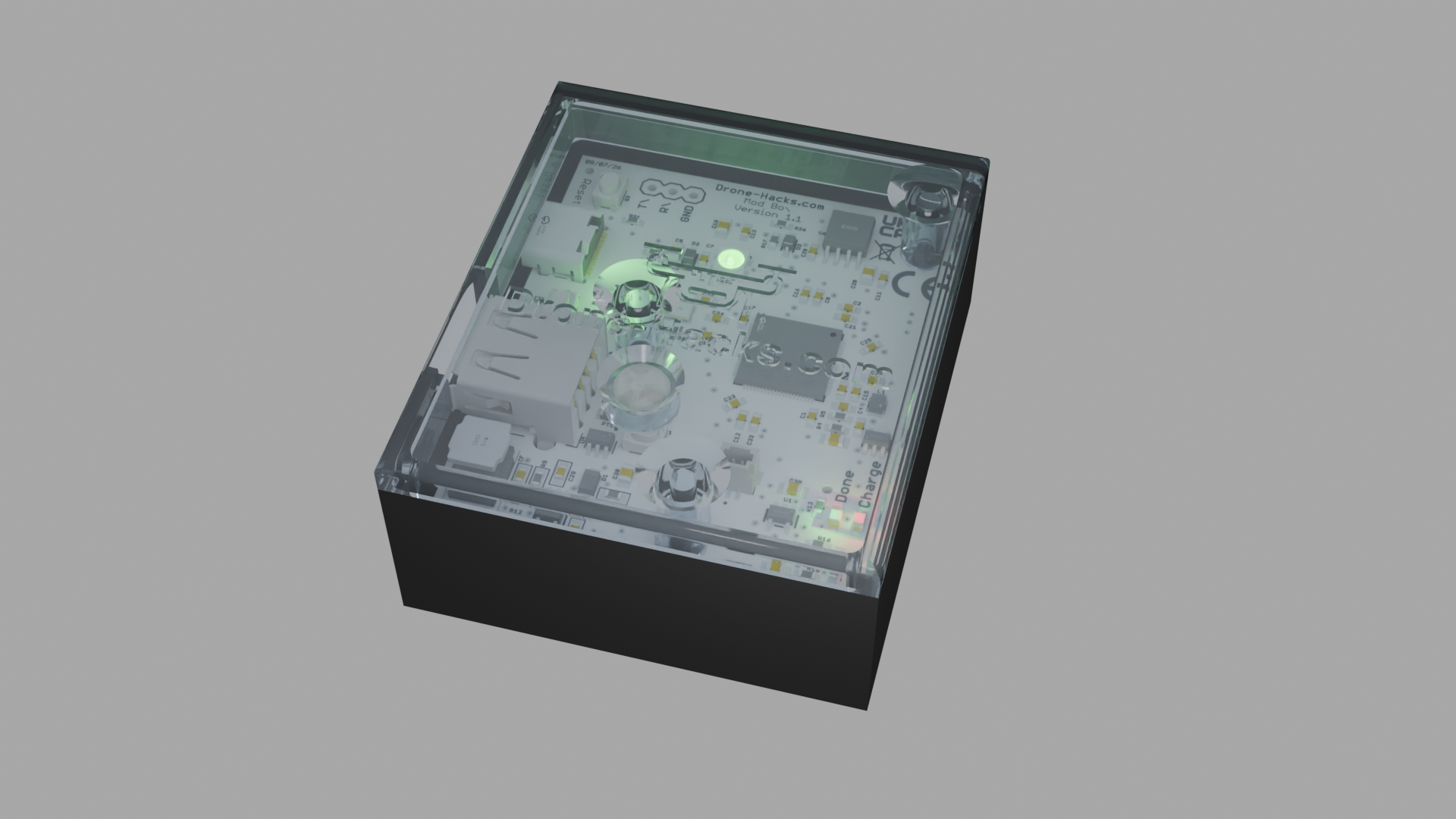
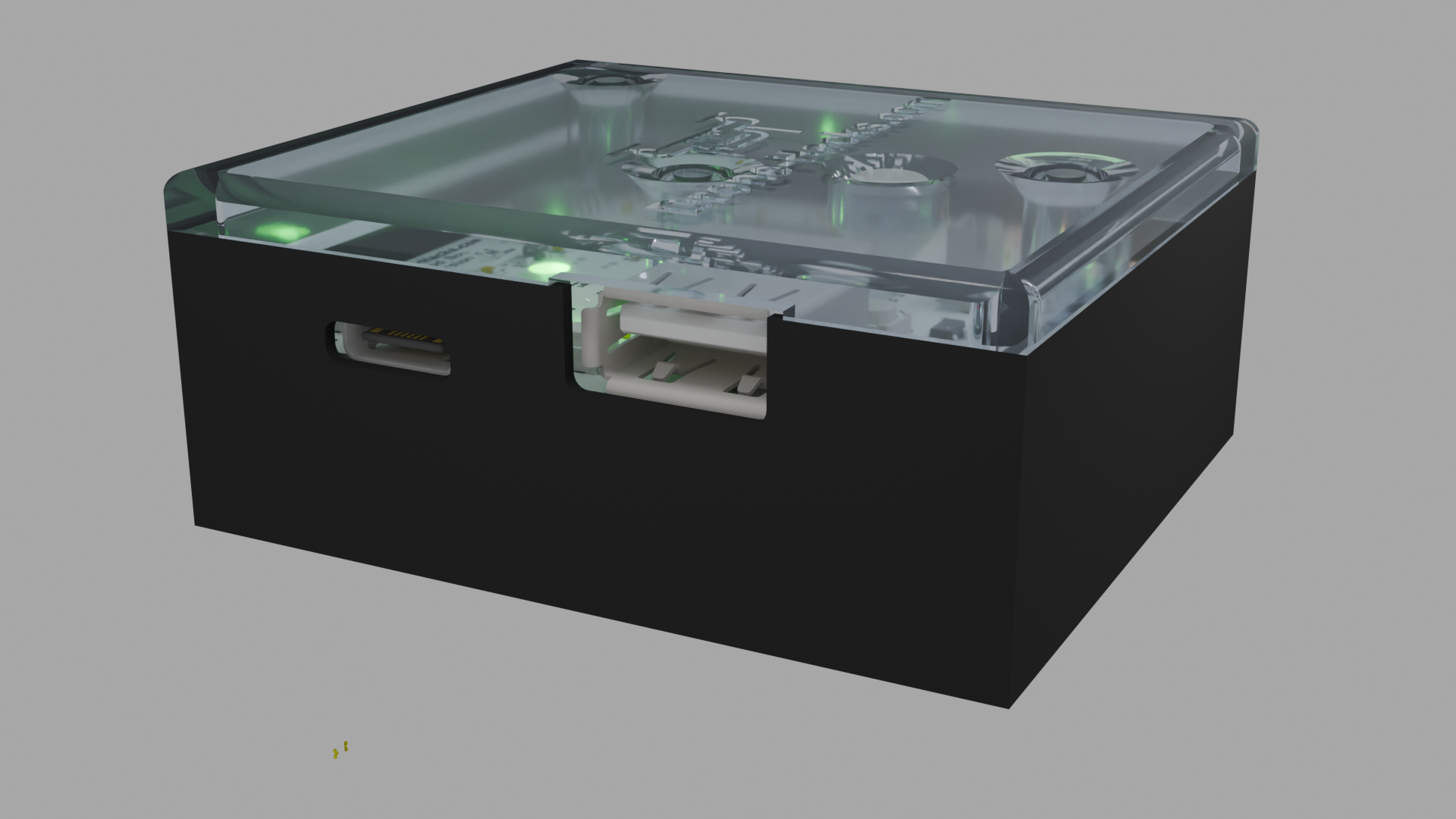
Looking on the left side of the box, you will see a USB-C port, this port is for charging the internal 500mah LiPo battery and for firmware updates, it cannot be used to send the One-Shot FCC hack to the drone.
Also on this side, you have a USB-A port. Using the cable included with your drone (or any known-good USB-C to USB-A cable) you can use this port to send the One-Shot FCC hack to your drone.
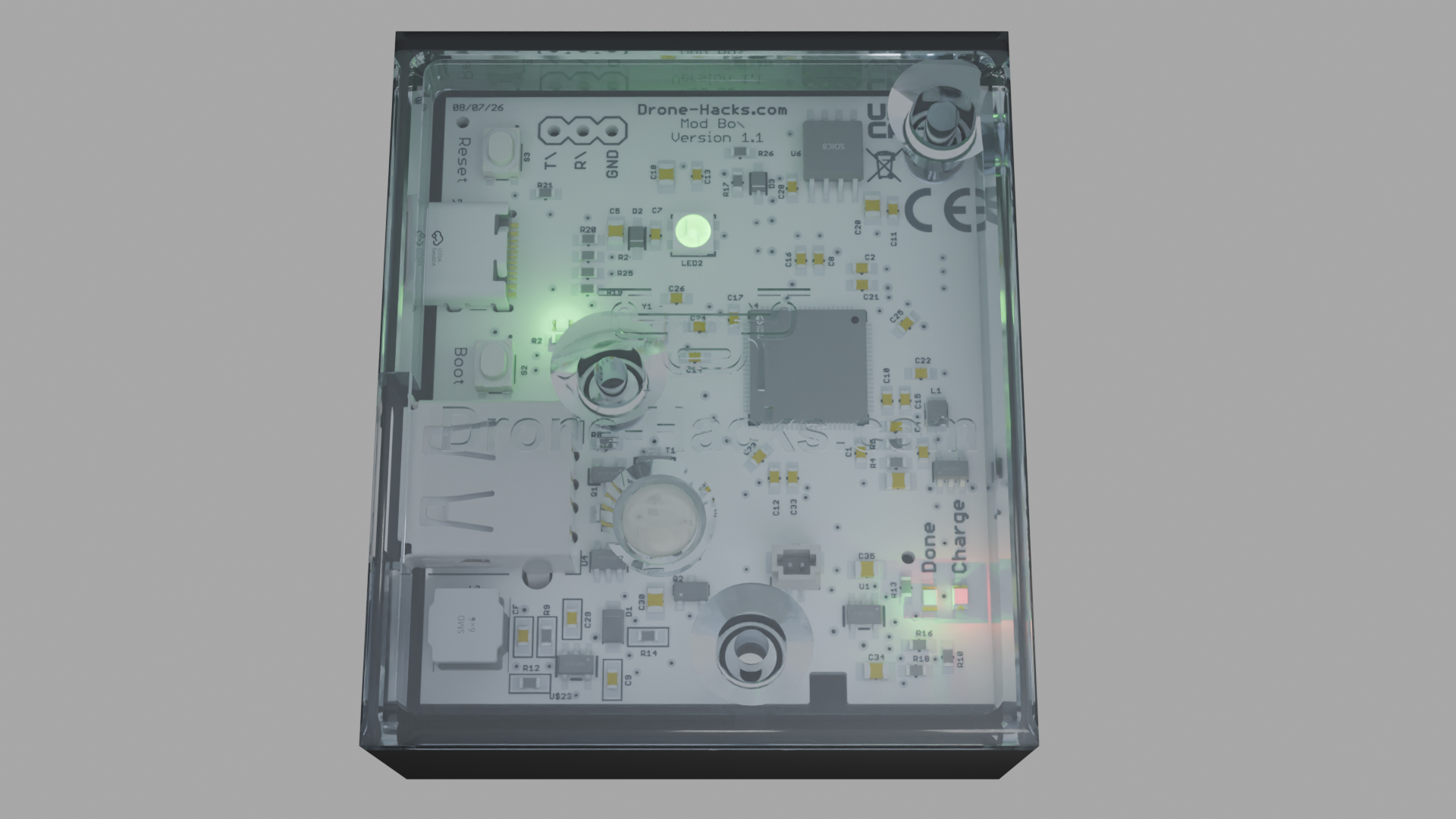
Through the clear top you can see the internal PCB and all of the status indicator LED's
¶ Using the DH Mod Box
Using the mod box could not be simpler and you can apply your hacks in 4 steps !
Note: Before you begin, make sure the drone and the RC are both powered on. Powering on the RC after using the Mod Box will cause the drone to switch back to CE mode!
- Power on the board by single pressing the power button located in the top of the clear lid. Wait for the status LED to start breathing blue.
- Connect the USB-A to USB-C cable between the mod box and your drone. As a reminder, the USB-A side goes into the Mod Box, the USB-C side goes to the drone.
- Wait for the status LED to change from blue, to orange and finally to green
- Disconnect the USB cable and check for FCC power levels (we have a guide on how you can do this linked HERE)
FCC power levels will now be enabled for this flight. The Drone-Hacks Mod Box applies One-Shot FCC, as such, power will revert to CE mode upon complete signal loss or the drone restarting.
¶ Charging
Your Drone-Hacks Mod Box comes with an included 500mAh LiPo battery which will need charging occasionally. To charge the box, please follow the steps below.
- Connect a USB-C cable with at least a 5v 1a supply to the USB-C port on the left side of the case.
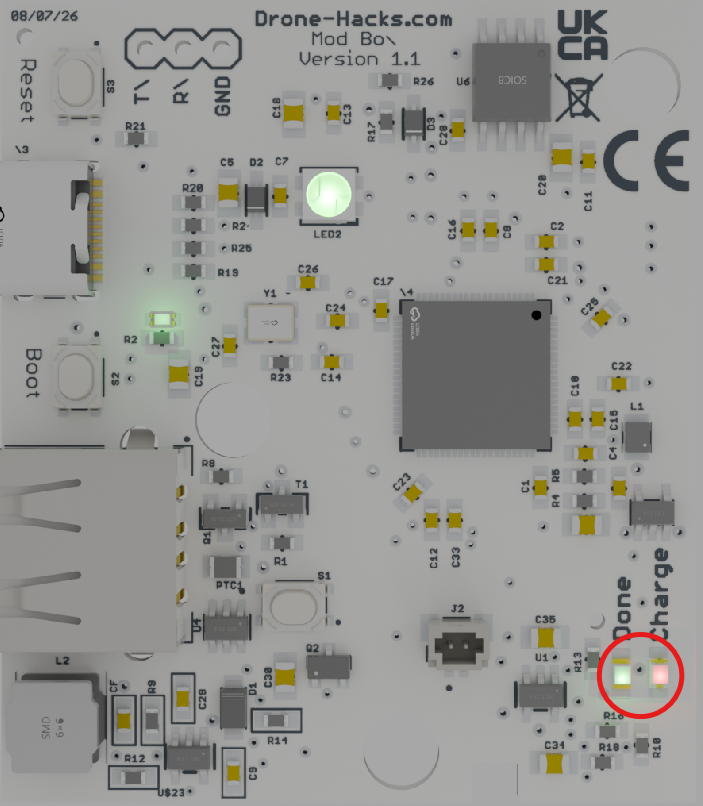
- The "Charge" LED will illuminate red.
- Charge the box until the green “Done” LED turns on.
- Note: the red “Charge” LED will stay illuminated at a low intensity even when the green Done LED is illuminated, however, if the green “Done” LED turns on, the battery is charged!
- Remove the charging cable.
¶ Status LED's
This section of the guide wil explain the meaning of all of the status LED's on the Drone-Hacks Mod Box.
| Power Indicator | |
| Location: | Left hand side of PCB |
| Colours: | Green - Board is turned on and powered from either the internal LiPo cell or the USB-C port. |
| Off - Board has no power and is safely turned off. | |
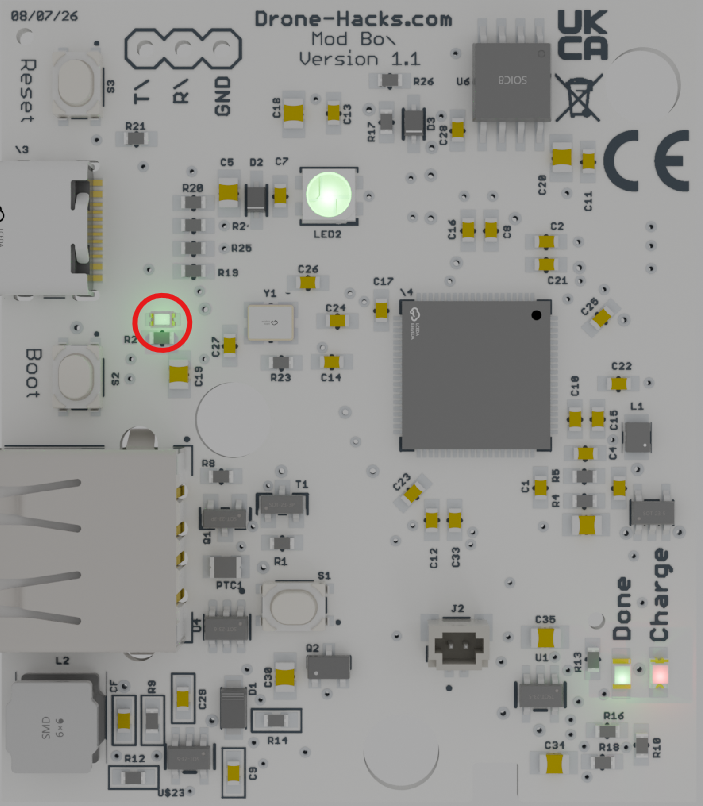 |
|
| Battery Charging LED's | |
| Location: | Bottom Right Corner of PCB |
| Colours: | Green - USB-C power is connected & internal LiPo battery has finished charging. |
| Red - USB-C power is connected & internal LiPo battery is charging | |
| Off - No power is connected to USB-C port. Battery is not charging. | |
 |
|
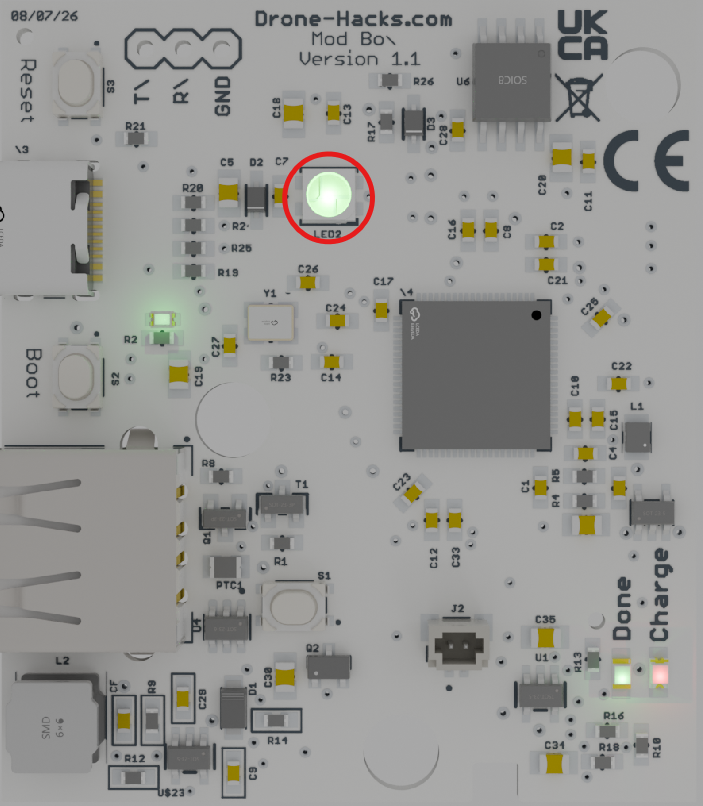
| Hack Status RBG LED | |
| Location: | Mid-line of PCB, Towards the Top |
| Colours: | Breathing Blue - Board is powered on, waiting for a USB connection to the drone |
| Solid Orange - Hack payload is being sent to the connected drone. Do not disconnect the USB cable. | |
| Flashing Orange - Drone model or firmware version not compatible or a bad USB cable. | |
| Solid Green - Hack is completed, you may remove the USB cable. | |
 |
|
¶ Troubleshooting Q&A
Q: My board will not power on.
A: Please try to fully charge the LiPo battery by connecting a 5v 1a minimum USB charger to the USB-C port and try again once the battery is charged. If the red charge indicator does not light up there could be a fault with the board of the internal battery, do not try to open the case to resolve the issue yourself. Please contact support at https://support.drone-hacks.com for further assistance.
Q: The Status indicator only ever stays on Orange.
A: This means the Mod Box is sending the hack commands to your drone, but it is not getting the expected response. Please verify your drone and firmware are compatible. If they are, perhaps you have an older version of the firmware on the Mod Box. Please try to update this using This Guide.